

Feedback is fuel for employee growth, engagement, and alignment. And one of the best times for employees to get feedback from their manager is during a one-on-one meeting. But without the right preparation, one-on-ones can turn into bland status update sessions, with no real substance.
If you follow a repeatable, step-by-step process, this preparation doesn’t need to take long. Below, we share six steps to prepare for your one-on-one, including reviewing goals, adding talking points, and revisiting feedback. This kind of structure helps employees take ownership of the process, turning routine check-ins into focused growth conversations.
{{rich-takeaway}}
Why Preparation Matters for Your One-on-One Meetings
Managers make a huge difference to employee engagement. Research from Gallup found that 70% of the variance in team engagement is determined by managers alone. But a manager’s time and attention are also scarce resources, said Malvika Jethmalani, an executive coach and founder of Atvis Group.
One of the best ways employees can maximize that time and attention is by making one-on-one conversations as structured and effective as possible. “Preparation ensures the conversation focuses on decisions, growth, and removing friction, not reciting information the manager could have read elsewhere,” explained Jethmalani.
This kind of preparation helps unlock benefits like:
- Clearer working relationships
- Better alignment on goals and priorities
- Faster growth through better feedback
- Fewer surprises in performance reviews
- Quick resolution of blockers or challenges
- More effective use of limited face time with managers
Those benefits can also positively affect an employee’s overall career growth. “In my experience, employees who prepare consistently progress faster in their careers because they use their one-on-ones to accelerate tangible business outcomes,” Jethmalani explained.
When an employee prepares for their one-on-ones, she said, each meeting becomes a strategic working session. When they don’t, it’s more like a status report. “You spend the time narrating what already happened, and it feels like nothing changes.”
The best way to ensure you fall into the former camp is to follow a step-by-step strategy to prepare for these meetings — just like the one we’ve outlined below.
6 Steps to Preparing for a One-on-One Meeting With Your Manager
Effective one-on-ones don’t happen by chance. “Preparation turns the one-on-one from a reactive check-in, often hijacked by the latest urgent request or whatever comes to mind first, into a strategic conversation,” shared Dana Zellers, an executive and leadership coach who works with managers to help them use one-on-ones as a tool for clarity, feedback, and growth rather than a weekly status ritual.
She added that this preparation time helps employees use their one-on-one meetings to get clarity, surface issues early, and ask for what they actually need instead of defaulting to what feels pressing that week. “It’s also a clear opportunity to demonstrate strategic thinking and leadership skills,” said Zellers.
This preparation doesn’t need to be a burden, either. Just 10-20 minutes of focused preparation can make all the difference. Use the six steps below as a repeatable checklist to review before each one-on-one.
1. Review your goals and progress.
First, review any active goals or objectives and key results (OKRs), depending on what your team uses. Here’s what to check:
- What’s changed since your last one-on-one
- Which milestones have been completed
- Where progress has stalled or where you need extra support
If you have them, come prepared with specific metrics or examples that show your progress. Zellers added that employees should also note any follow-ups from previous conversations, plus whether action has been taken. “This creates continuity week to week and makes preparation fast and sustainable,” she added.
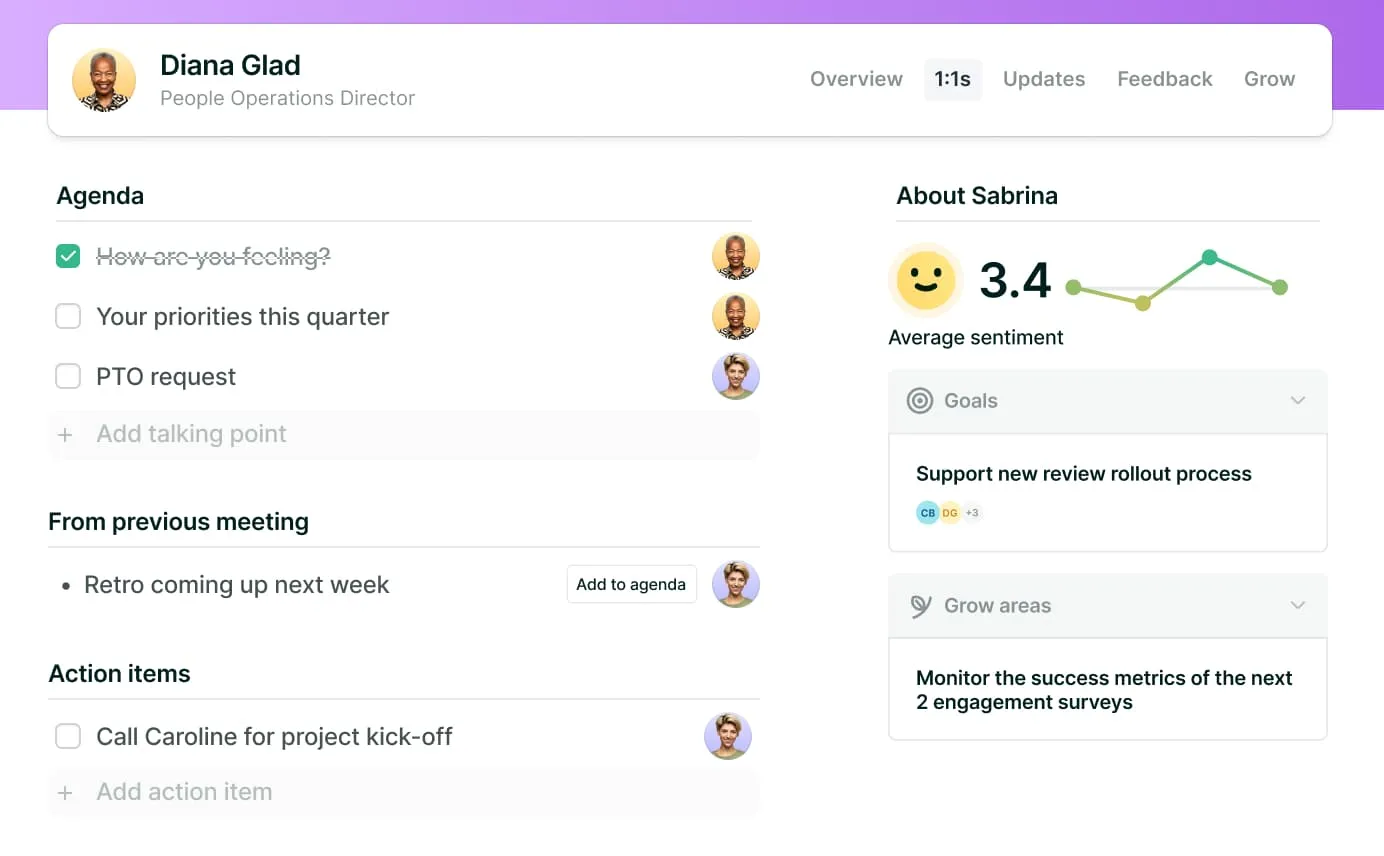
💡Top tip: Use Lattice 1:1s to quickly pull goals into the context of one-on-one conversations, so you can easily reference progress and priorities without switching between tools or documents.
2. Add talking points to your shared agenda.
Aim to add talking points to a meeting agenda at least a day before your meeting. “Adding a few talking points to a shared agenda keeps the conversation focused,” explained Paola Accettola, CEO and principal consultant at True North HR Consulting.
This approach also gives your manager time to review them and prepare, and prevents you from spending the first 10 minutes of a one-on-one discussing what to cover.
Avoid adding anything that can be handled asynchronously, like routine status updates or project check-ins. Instead, prioritize topics that benefit from real-time discussion, like:
- Specific feedback
- Career development
- Blockers or challenges (more on these in Step 4)
Finally, be specific in your shared agenda. Rather than adding “Updates” as a talking point, include items like “Discuss timeline concerns on Project X,” “Request feedback on presentation skills,” or “Align on next-quarter priorities.”
{{rich-highlight-2}}
3. Gather your recent updates and wins.
Next, create a short list of what you’ve accomplished since your last one-on-one. Include items like:
- Problems you solved
- Deliverables you submitted
- Your contributions to team outcomes
These kinds of specific, day-to-day details help your manager quickly understand your impact, especially if they have multiple direct reports. For each accomplishment, bring evidence where possible. Providing metrics, examples, or outcomes turns these updates into an indicator of your performance rather than a general recap.
💡Top tip: Lattice Updates let you capture wins and challenges as they happen, so one-on-one prep becomes a quick review rather than a memory test.
4. Identify blockers and challenges.
These meetings are the perfect time to discuss technical blockers, interpersonal challenges, and process problems before they grow into larger issues.
“When raising blockers or challenges, the most effective approach is to be clear and constructive,” said Accettola. “Explain the issue, why it matters, and what you have already tried.” She added that this approach also helps managers understand where systems, resources, or priorities may need adjustment.
Jethmalani recommended that, when possible, employees should combine this context with potential solutions. “Instead of saying, ‘I’m stuck,’ say something like, ‘Legal review is slowing this down. I see our two options as A. Escalate, or B. Adjust scope. Given that Legal is down two people, I recommend adjusting scope. What do you think?’”
She added that managers typically respond much better when employees frame challenges with possible solutions and come to the table with recommendations. “It shows ownership and speeds decisions,” she said.
{{rich-highlight-4}}
5. Prepare questions for your manager.
One-on-ones aren’t just reporting sessions. They’re also the perfect opportunity to learn and grow. To harness this opportunity, prepare two or three questions you can ask your manager at your next one-on-one. Topics might include feedback on your recent work, clarity on priorities, or organizational context.
Accettola added that questions about long-term goals, career paths, and upcoming opportunities also help managers provide more tailored guidance. She recommended asking questions like these to draw valuable insights from your manager:
- How am I doing relative to expectations?
- Where can I take on more responsibility?
- What skills would be most valuable to develop next?
💡Top tip: Documenting your goals and growth areas in Lattice means they’ll be surfaced as talking points in one-on-ones and performance reviews, making achievements more visible when it matters most.
Want more inspiration? Here are 80 great one-on-one meeting questions for managers and employees.
6. Review feedback and past one-on-one notes.
The last step of preparing for your one-on-one meeting is to review notes from your previous one-on-one. Look for action items you committed to, and be ready to share progress or results. Revisit any open topics, so nothing important falls through the cracks.
Before your meeting, review recent feedback and choose one area to follow up on, whether to share an improvement, ask a clarifying question, or request support.
{{rich-highlight-3}}
What to Do During Your One-on-One
Rather than viewing a one-on-one as a manager-led check-in, use it as your dedicated space for feedback, alignment, and growth.
“The most effective employees treat their one-on-ones as part of their business toolkit, not just a calendar obligation,” said Jethmalani. “When employees take ownership by preparing thoughtfully, asking for decisions, seeking feedback, and discussing career growth, these meetings become one of the most powerful levers for performance and development.”
To achieve the same, use these top tips for getting one-on-one meetings right:
- Own the conversation. As the employee, you drive the agenda. Start with your most important or time-sensitive topic first in case time runs short. Rather than routine updates, this opener should be a blocker, a feedback request, or a personal development question.
- Be present. If you need to share a status update, keep it quick before moving on. Aim to focus most of the conversation on feedback, priorities, decisions, and development. Remember that one-on-ones are most effective when they’re forward-looking and problem-solving, not just retrospective.
- Ask for constructive feedback. Receiving regular developmental feedback can help keep you from feeling blindsided by criticism in a formal review, and it supports your continuous professional development. If your manager doesn’t proactively offer feedback, ask for it. For example, ask: “What’s one thing I could improve based on my recent work?” or “How can I operate at a higher level?”
- Take meeting notes in real time. Capture key points, commitments, and action items during the meeting so nothing gets lost. Write down who owns what and any deadlines discussed.
💡Top tip: Use the Lattice Meeting Agent to automatically capture notes and action items, so you can stay focused on the conversation instead of documenting everything manually.
Following Up After Your One-on-One
After you leave the conference room or end the video call, it’s your chance to show what you got out of the one-on-one. Consistently following up and acting on what’s been discussed can help you reach your goals (and build your manager’s trust). Here’s where to start:
- Document action items and owners. Record what was agreed, who’s responsible, and any timing expectations. This avoids misunderstandings and creates accountability for both you and your manager.
- Follow through before the next meeting. Acting on feedback and completing any next steps shows ownership and reliability. Even partial progress is worth reporting on because it keeps your momentum visible.
- Capture wins, blockers, and questions as they happen. Instead of struggling to remember everything before your next one-on-one, log important moments as they happen. This streamlines prep work and ensures you can keep track of important details.
💡Top tip: Lattice action items help track follow-ups across meetings and automatically carry forward unfinished agenda items, so important topics don’t get dropped from week to week.
{{rich-highlight-1}}
FAQs
How often should I have a one-on-one with my manager?
Most team members benefit from weekly or biweekly one-on-ones, but the cadence should always be agreed on between employees and their manager. Weekly meetings work well for fast-moving roles or junior employees who may need more guidance. Biweekly or monthly meetings can be more effective for employees with a high level of autonomy. The key is consistency. Regular one-on-one meetings help keep feedback flowing and reduce surprises.
What should I do if my manager keeps canceling our one-on-ones?
Start by assuming positive intent. Perhaps they’ve been preoccupied with hiring a new team member, or a new project has recently impacted their work-life balance. Raise the issue directly with your manager, preferably in person if possible. Try a simple statement like “I find our one-on-ones really helpful for staying on track. Would it be possible to schedule a recurring time?” If cancellations continue, raise the issue again, send an agenda ahead of time, and show consistent preparation.
How long should a one-on-one meeting last?
Most one-on-ones typically last 30 to 60 minutes. Shorter, regular meetings may work for weekly, focused sessions, while longer meetings are useful for deeper conversations around career goals, feedback, or challenges. If you can’t cover one or two meaningful topics without running out of time, consider extending the next meeting or checking if there’s anything that could be moved to async channels, like status update conversations.
What topics are better handled outside a one-on-one (and how do I raise them safely)?
Routine status updates, specific project check-ins, and things like PTO approvals are usually better handled using HR tech, emails, or chat. Urgent or sensitive issues usually need a faster or more formal channel. If you’re unsure, flag the issue in your one-on-one agenda and ask your manager for advice. This keeps things transparent while also using the right channels or workflows.
What can I do to make one-on-ones feel safer and more honest over time?
Transparency, support, feedback, and freedom of expression all help establish psychological safety at work. During one-on-one sessions, show that you can act on feedback, admit mistakes, and ask thoughtful questions. Over time, a predictable one-on-one structure, documented action items, and ongoing dialogue make one-on-ones feel less like evaluations and more like an ongoing, respectful working partnership.
How Lattice Helps You Prepare for One-on-One Meetings
With the right HR tech, preparing for one-on-one meetings doesn’t need to take long.
Lattice brings preparation and follow-through into one connected space, so conversations are faster and more effective. Key features include:
- Collaborative agendas: Add talking points ahead of time, so both you and your manager stay informed and prepared.
- In-meeting context: View goals, updates, and past one-on-one notes alongside the meeting agenda, so you can focus on the conversation instead of searching for details across tools.
- Action items: Quickly assign and track follow-ups, so nothing falls through the cracks.
- Lattice AI Agent: Ask the AI Agent to summarize themes from past one-on-ones, surface feedback patterns, or remind you of open commitments.
- Lattice Meeting Agent: To stay focused on the discussion, let the Meeting Agent capture notes and action items for you.
Lattice helps turn one-on-ones into productive growth conversations. Request your free demo to learn how Lattice helps employees and managers get the most out of every meeting.

Get a head start on your next 1:1.
Use Lattice’s one-on-one agenda template and suggested talking points as optional prompts to guide meaningful, productive conversations with your manager.

Recaps and reflections at your fingertips.
Use Lattice AI Agent to summarize themes from recent one-on-ones, highlight repeated feedback patterns, or surface open action items you previously agreed to. Then use these as a structured starting point for your conversation.
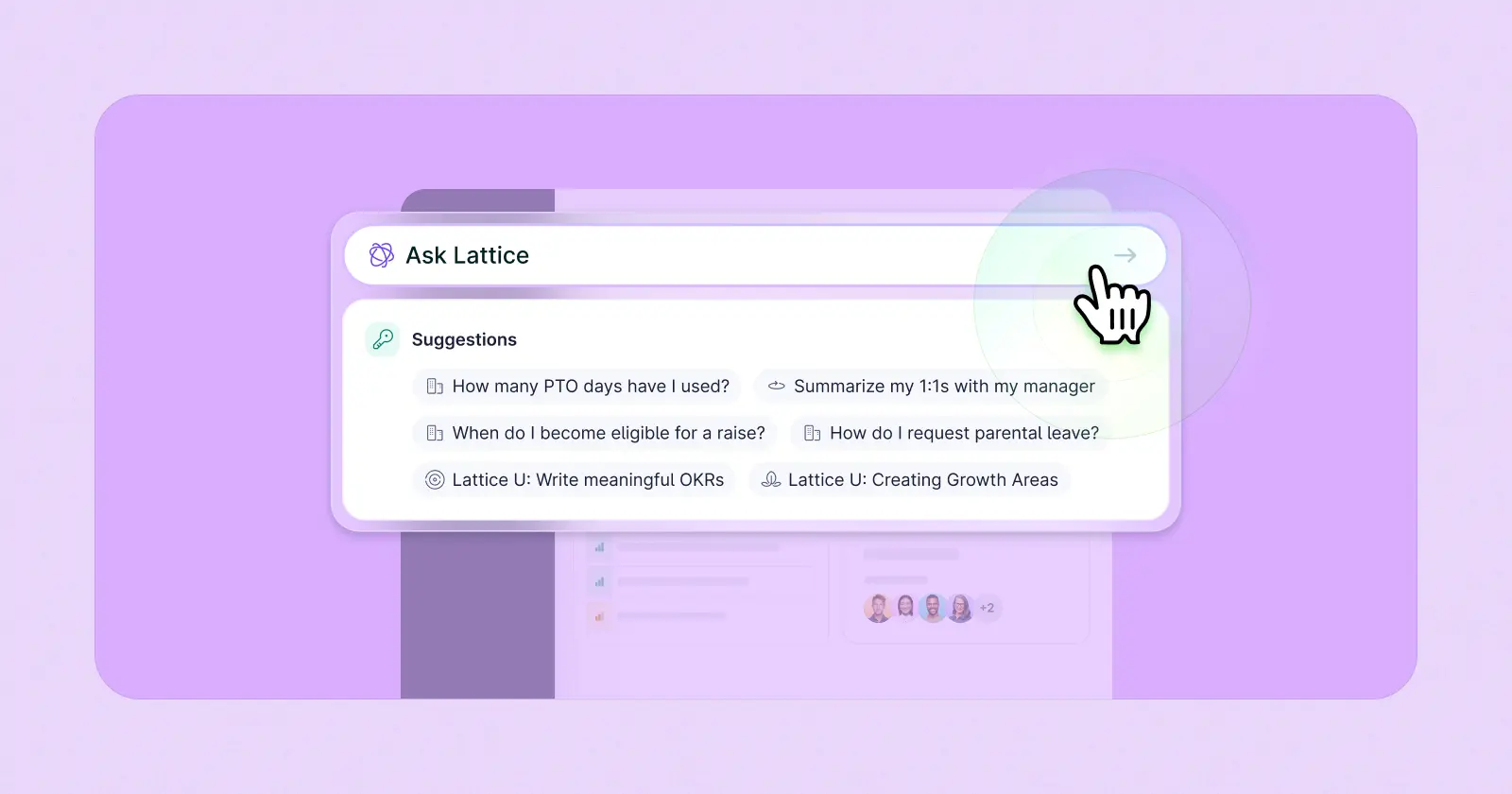
Get more out of your 1:1s with Lattice AI Agent.
Lattice AI automatically synthesizes and surfaces potential issues, and it provides coaching on how to bring them up in your next one-on-one.
Key Takeaways:
- Preparation helps ensure one-on-one conversations lead to better feedback, faster growth, stronger alignment, and clearer working relationships.
- A structured approach to preparation makes it easier to gather all the information you need for a productive one-on-one.
- During a one-on-one with your manager, own the conversation. Start with your top priorities, ask for feedback, take notes, and capture action items.
- After a one-on-one, document commitments, track next steps, and note wins or challenges between meetings.
- Lattice 1:1s support employees with features like collaborative agendas, trackable action items, in-meeting context, and AI agents that capture notes so you can stay focused on the conversation.