

Performance reviews always seem to take longer than they should. Coming up with the appropriate wording for each employee, combined with the fear of getting it wrong? That’s a perfect recipe for writer’s block.
In despair, you wonder: “Is it cheating if I get ChatGPT to do this?”
The good news: No, it doesn’t have to be — if you do it wisely. As author Mark Manson put it in an interview with Writing Routines: “Writer’s block is just another name for anxiety.” And AI doesn’t feel anxiety. It can help you get unstuck, so you can plough through your reviews quickly and convincingly.
Of course, there’s a catch. OpenAI’s ChatGPT is a powerful tool, but it doesn’t know your people or your business. All it has to go on is what you tell it. You still have to prompt it with the right information about your employees, so you can give them an honest review and not one that sounds…well, like a robot wrote it.
But fear not: We’re here to help you get the most out of ChatGPT so you can prompt it to produce tailored performance review content that sounds human. This guide will share phrasing templates for effective prompts, tactics to avoid legal and ethical missteps, and guidance on using ChatGPT responsibly (and when it’s time to add a human layer).
Using ChatGPT for Performance Reviews: Benefits and Limitations
If you have a stack of performance reviews to write in short order, ChatGPT can be a lifesaver. But it does have its limits.
ChatGPT’s Benefits (When You Use It Carefully)
When you understand ChatGPT’s limits, you can tap into its real strengths:
- It’s super-fast. ChatGPT responds to your prompts in the blink of an eye (or two — depending on how detailed your prompt is). It helps managers get unstuck faster.
- It calibrates your tone. If its outputs come across as too formal or formulaic, you can tell it so using a follow-up prompt. It will tweak and refine the tone and language until it sounds the way you want.
- It can help you build clarity. By adding detail to your prompts and follow-ups, you can reduce any vagueness, tighten up your reviews, and make sure that you cover all the important bases.
ChatGPT’s Limitations
Here are a few things to keep in mind before you rely on the tool too heavily.
- It’s a blank slate. It doesn’t have access to your team members’ day-to-day performance activity, feedback, and role-specific expectations. It needs you to prompt it with all the details required to produce the results you want.
- It’s not personalized. The last thing your employees want is a robotic review with all the personal relevance of a fortune cookie. But without the context and details of your employees, ChatGPT’s output can be so generic that it won’t ring true.
- It’s not so secure. ChatGPT doesn’t have the built-in bias safeguards or documentation protocols to safely input employee data or ensure compliance with regulations.
- It’s not consistent. With ChatGPT, you can’t sync your approach across departments. There’s no system in place, so prompts are going to vary from person to person, and the results will, too. And that’s not the most solid basis for a fair and consistent review process across an organization.
None of this is to say ChatGPT isn’t useful for performance reviews. It has real benefits — once you know how to use it wisely and well. But first, you need to know what makes for a good performance review prompt.
The Anatomy of a Good Performance Review Prompt
Give ChatGPT vague and basic prompts (like, “Write an annual review for someone who did a good job”) and you’ll get generic, unsatisfactory outputs. As the saying goes: garbage in, garbage out.
ChatGPT can be seriously impressive, but it’s not a mind reader. The more context you give it, the better your results will be — and the less time you’ll spend going back and forth. A strong opening prompt should include clear and specific details, such as:
- Your employee’s role or job title
- Their milestone achievements or outcomes of the key projects they’ve worked on
- Feedback from their peers or from one-on-one meetings with their line manager
- The key skills or behaviors you’ve evaluated or want to highlight
- Their goals or OKRs, and whether they were met
- The tone you want to use: professional, supportive, etc.
So, a more effective prompt could be:
“Write feedback for [employee name], a [job title] who [achievement] during [review period].”
Let’s explore how these compare in action:
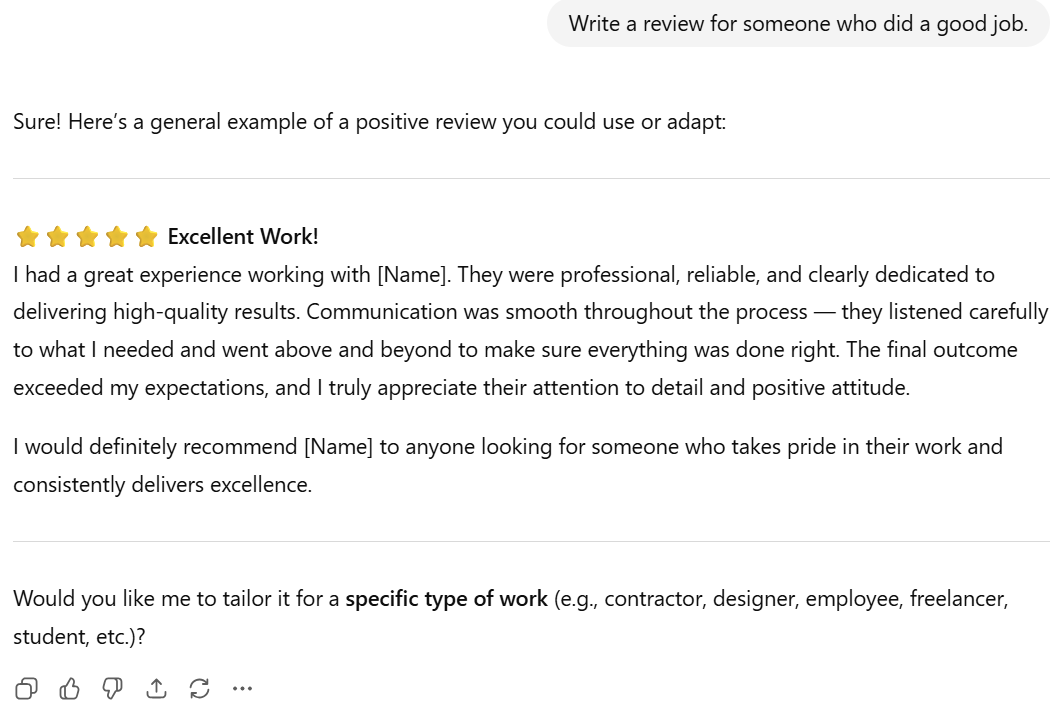
In that example, a generic prompt earned a generic answer, with fluffy boilerplate compliments that could only match your employee’s performance by pure coincidence. And it reads more like a Yelp review than an actual performance evaluation.
Notice, though, how ChatGPT itself is prompting us to be more specific. If we’d started with a more detailed prompt, we’d have gotten a better first result, like this:
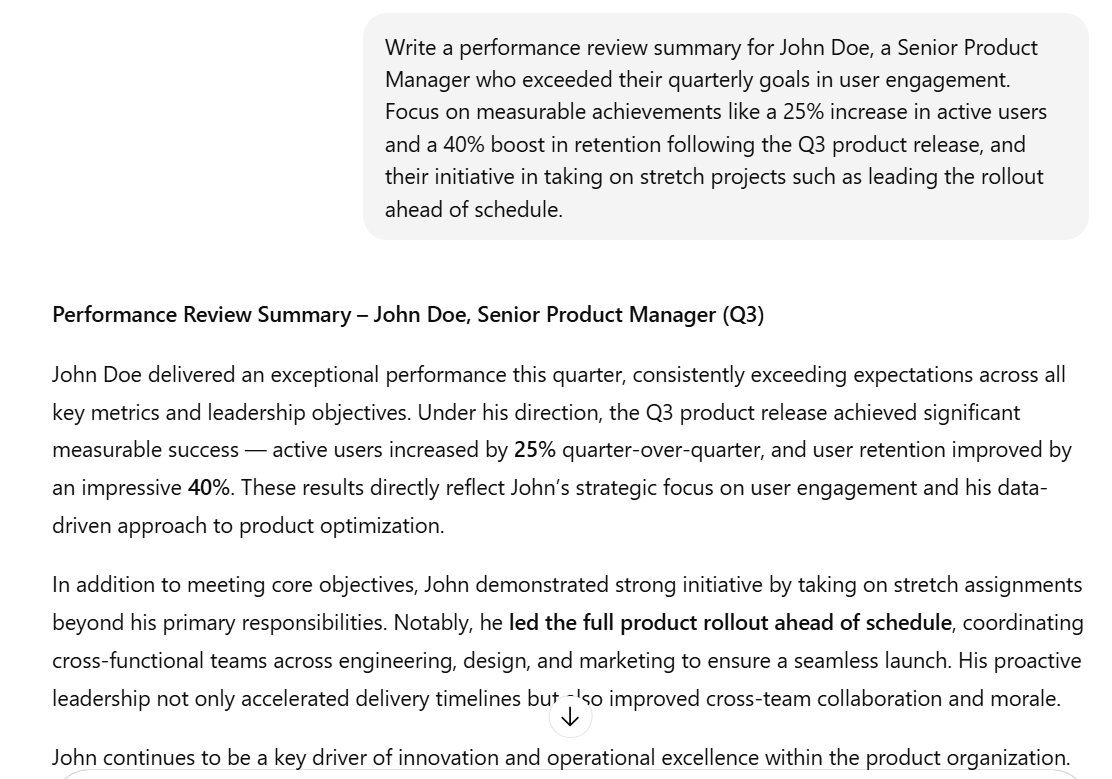
We should mention that Lattice AI can do this without all the prompting back-and-forth. That’s because Lattice AI already has secure access to your employee data, feedback, goals, company policies, and performance metrics. So it can surface them automatically to produce tailored performance review drafts from the start.
But if you don’t have Lattice yet, the following sections will give you some useful ChatGPT prompt templates for a range of scenarios, so you don’t have to start your performance reviews from scratch every time.
ChatGPT Prompts for Managers Writing Reviews
Whether you need to give positive or constructive feedback, or help employees think through their performance and set development goals, here are some prompt templates to get the ball rolling.
Positive Feedback Prompts
- To acknowledge achievements: “Write a positive performance review for [employee name], a [role title], highlighting [specific metrics of key strengths and project completion milestones], and [examples of effective team collaboration or leadership] that contributed to team success.”
- To celebrate team impact or other qualities: “Generate a performance review paragraph that praises [employee name] for their [qualities, e.g., teamwork, reliability, problem-solving skills, professional growth] over the past [timeframe]. Include [examples of those qualities].”
- To motivate career growth: “Create a strengths-based performance summary for [employee name] that celebrates [recent wins] and outlines how these accomplishments position them for future growth. Use positive, motivational language while maintaining a professional tone.”
{{rich-highlight-3}}
Constructive Feedback Prompts
- To address certain behavior: “Write constructive feedback for [direct report], focusing on [specific behaviors or patterns, e.g., communication gaps, missed deadlines]. Use neutral, factual language that links each behavior to its impact and includes suggestions for improvement.”
- To offer balanced feedback: “Draft a performance review using the ‘Start, Stop, Continue’ model for [employee name]. They should start [activity or behavior] to enhance [effect], stop [activity or behavior] to reduce [effect], and continue [activity or behavior] to maintain [effect].”
- To focus on development: “Compose a feedback paragraph for [employee name] that addresses [one or two skills gaps or development areas observed] during [timeframe]. Focus on what can be improved, and outline actionable steps. Use action-oriented coaching language rather than criticism.”
Goal-Setting Prompts
- To set SMART goals: “Write a section of a performance review for [employee name] outlining SMART goals for the next [timeframe]. Include professional development targets that align with [business objectives, e.g., supporting pipeline growth or improving conversion rates].”
- To plan career growth or skill expansion: “Generate a performance review paragraph for [employee name], spelling out [future growth opportunities, e.g., acquiring new skills, leading larger projects, or mentoring others]. Frame goals in terms of both short-term development toward [short-term objectives] and long-term career trajectory toward [long-term goal].”
- To spark reflective goal setting: “Create a review prompt for [employee name] that encourages reflection on [details of their past performance] and helps define actionable goals for the next cycle. Use SMART goal criteria and focus on stretch opportunities that build on [their current strengths].”
ChatGPT Prompts for Self-Evaluations
It can be even more awkward to write about your own performance than about your employees. Maybe you’re proud of your strengths and achievements, but you don’t want to sound arrogant. Or maybe you’re afraid your boss will see negatives in your positives.
Using AI can help you balance confidence and honesty. Here are some prompts to get you started.
- To spotlight your achievements: “Help me write a self-assessment section highlighting my key achievements as a [role/title] during [timeframe, e.g., the past year]. I want to emphasize how I achieved [specific goal or milestone], resulting in [quantifiable or qualitative impact, e.g., percent increase, improved efficiency, customer satisfaction]. Make it sound confident but humble.”
- To address your challenges: “Help me draft a section of my self-review discussing a challenge I faced in [specific area/project]. The issue was [brief description], which impacted [team/process/outcome]. I want to acknowledge it constructively, explain what I learned, and outline how I plan to improve in [next steps or strategies].”
- To set your goals for growth: “Help me write the goal-setting section of my self-evaluation as [role/title] during [timeframe]. Write my goals, [goal 1], [goal 2], and [goal 3], as SMART (specific, measurable, achievable, relevant, time-bound) goals. Emphasize commitment to growth and alignment with [specific team or company objectives].”
ChatGPT Prompts for Peer Reviews
For some, peer performance reviews are especially daunting. But giving feedback to your teammates, colleagues, and peers is a vital part of maintaining a company culture of continuous feedback. You want to be constructive without coming across as judgmental or insincere. ChatGPT can help you strike a balance between clarity and tact.
- To acknowledge strengths: “Help me write a peer review recognizing [colleague’s name] for their strengths as a [role or team function]. I want to highlight [specific examples] of when they demonstrated [key skill or behavior, e.g., collaboration, reliability, innovation], which resulted in [positive outcome, e.g., improved workflow, better team communication, project success]. Keep the tone appreciative but objective.”
- To suggest areas for improvement: “Help me write a constructive peer review for [colleague’s name] that focuses on an area where they could improve. The issue involves [specific behavior or process, not personality], which sometimes affects [impact or outcome]. Phrase the feedback respectfully, suggesting potential ways to improve while emphasizing [shared goals and collaboration]. Use behavior-based language (e.g., ‘When doing X, it sometimes leads to Y’).”
- To give balanced feedback: “Draft a peer feedback summary for [colleague’s name] that blends recognition and growth feedback. Highlight specific strengths (e.g., [example of effective behavior]) and describe one improvement opportunity (e.g., [specific skill gap or process]) in a constructive, forward-looking way. Avoid formulaic phrasing — aim for sincerity and professionalism.”
Best Practices for Refining AI Outputs
ChatGPT rarely gets it perfect on the first try. But the trick is to treat that initial response as a starting point in a process of experimentation, following these steps: prompt, review, personalize, then calibrate.
You can refine the output with follow-up prompts until the results reflect reality and sound like something you’d actually say.
Here are five common complaints about ChatGPT responses, with suggestions for follow-up prompts:
It’s not hitting the right tone.
If the feedback sounds too formal, too harsh, or too soft, prompt ChatGPT with specifics about how you’d like it to come across:
- “Make this more growth-oriented and less critical.”
- “This is too harsh. Rephrase to be constructive, but with a more encouraging tone.”
- “Make this more direct — it’s too soft right now.”
It’s too generic or lacking specifics.
If the first results seem a little too cookie-cutter, push ChatGPT to get more specific. Give extra information or prompt it to include concrete details from the real situation.
- “Add examples from the attached Q3 marketing campaign project.”
- “Make this more specific to a junior-level engineer who’s still learning our codebase.”
- “Include a reference to the client presentation they led in August.”
- “This is too vague. Be more direct about the issue with missed deadlines.”
It sounds too much like AI.
ChatGPT loves buzzwords. It also loves to flatter. But you don’t want your feedback to sound cold and corporate. Nor do you want it to sound fawning and insincere. Use prompts like these to nudge it into sounding more human.
- “Remove corporate jargon and use simpler language.”
- “Rewrite this so it sounds like a real conversation, not a performance review template.”
- “Make this less formal — we have a casual team culture.”
It’s too deep in the weeds.
AI can sometimes go overboard with nitty-gritty details and bullet points. Other times, you might like the content of one answer but the tone of another. You can use follow-up prompts to merge ideas, reformat the layout, or improve the consistency.
- “Take the specificity from version one and the tone from version two, and combine them into one polished paragraph.”
- “Summarize these points in conversational language.”
How to Use AI Prompts Responsibly
Performance reviews should always be approached from a position of fairness, respect, and transparency. When you’re using AI to help with those reviews, you have a duty to make sure your inputs and outputs follow that spirit.
Here are some guidelines for using AI prompts responsibly.
Always review and approve.
ChatGPT can produce some seriously impressive outputs. But “impressive” doesn’t mean “ready to go.” You should never simply copy-paste AI output. ChatGPT can sound confident even when it’s not right or is missing context. Always treat AI output as an unfinished draft. It should be your judgment, not ChatGPT’s, that decides the final version.
Personalize AI outputs for tone and accuracy.
Employees don’t want to feel like they’re getting impersonal feedback from a robot. Their reviews should sound human and empathetic. Make tweaks for how each employee communicates, and include specifics about what they’ve done well and what they’re working on.
Watch for bias and coded language.
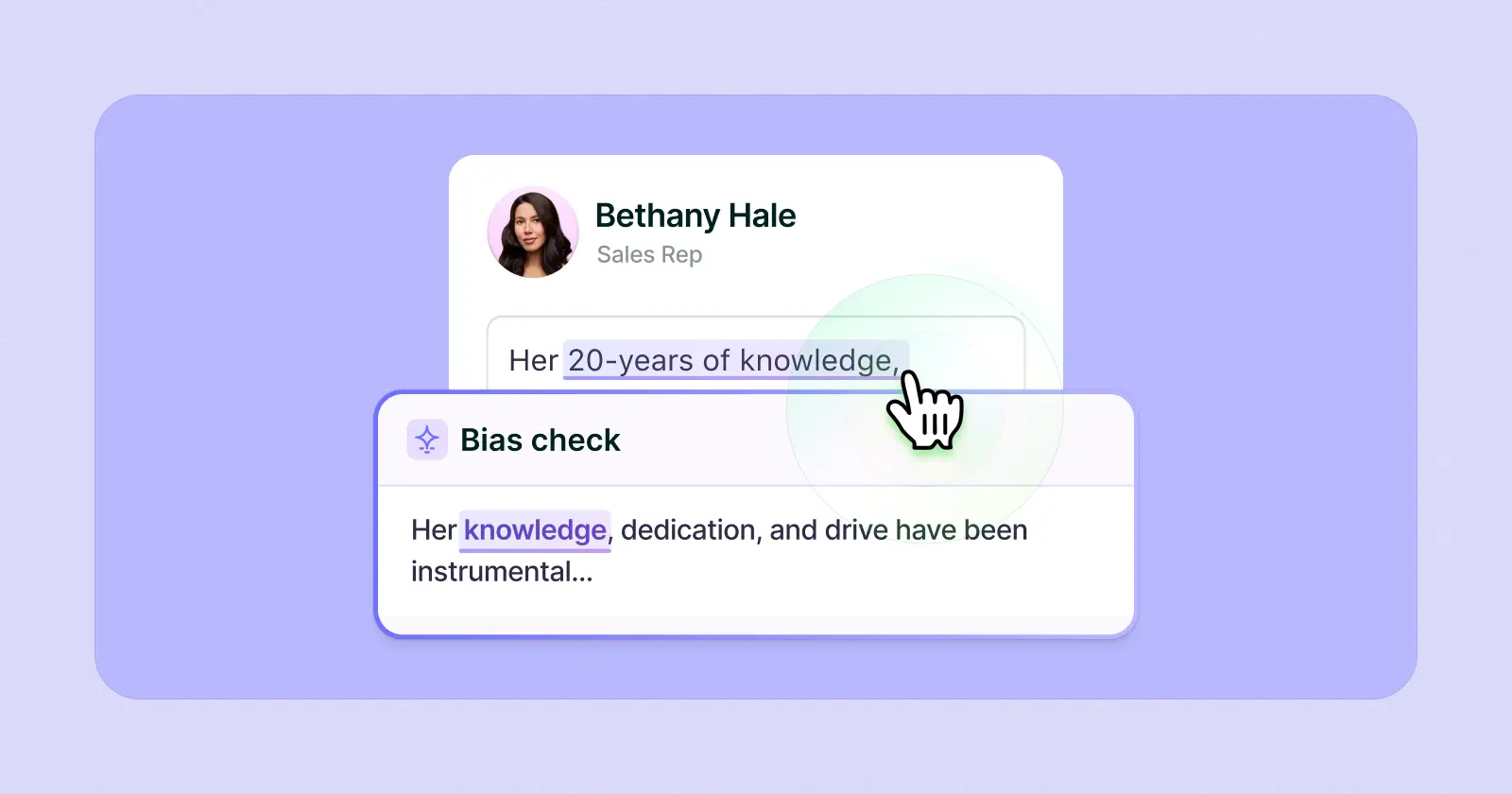
ChatGPT can identify and flag biased language and attitudes in your text, such as if you’ve described the same behaviors as “assertive” in men but “aggressive” in women. But it can also reproduce prejudices if they exist in the data it’s given.
Be diligent about the wording of your inputs and of ChatGPT’s outputs. Check for neutrality and objectivity — and avoid language around gender, age, race, or character.
When in doubt, use HR-reviewed systems.
Put yourself in your employees’ shoes and imagine how the language would sound to them — unclear, risky, even potentially upsetting?
If ChatGPT’s output gives you pause or raises any red flags, play it safe. Consider an alternative tool like Lattice, which is specifically designed for HR teams and built with fairness in mind.
What You Should Never Put in a ChatGPT Prompt
While ChatGPT needs plenty of detailed input to give you quality output, you can give it too much. Responsible AI use means knowing what to leave out of your prompts as much as what to put in.
Here’s a list of what to avoid adding to your prompts.
High-Risk Prompt Inputs to Avoid
- Private health or medical information: Including this could constitute a confidentiality or data breach, and put you on the wrong side of privacy laws like HIPAA, not to mention undermining your employees’ trust.
- Personal leave details: Mentioning sick leave or parental leave could introduce bias and lead ChatGPT to draw inferences that have nothing to do with an employee’s performance.
- Disciplinary issues: Sensitive, case-by-case specifics about attendance or probationary actions are private and confidential, and should be handled directly by HR staff, not by AI prompts.
- Protected class identifiers: Referencing characteristics such as age, gender, race, religion, or disability can not only introduce bias but also expose you to legal risks.
- Coded or biased phrasing: Loaded language (e.g., “tends to be emotional” or “strong English for someone from…”) can perpetuate stereotypes and undermine fairness, objectivity, and inclusivity in reviews.
Remember: ChatGPT isn’t a compliance tool. It isn’t bound by your company’s data policies, and it’s no more obligated to you, your company, or your staff than to any other user.
That’s why organizations opt for structured and secure systems like Lattice. Lattice is specifically designed for HR workflows, not open-ended text generation. It has the certified data security to not only protect your employees’ and company’s information, but also to use it safely for more accurate, relevant, and context-rich results.
What ChatGPT Can’t Handle — And When to Use a System Like Lattice Instead
Generative AI tools like ChatGPT are great for overcoming that blank-page anxiety, polishing your phrasing, and getting your reviews together faster.
But while ChatGPT is a helpful co-writer for drafting your reviews, it’s not built for your people.
ChatGPT speeds up your drafts, but only after you give it the right context. Lattice AI already has that context. It’s connected directly to your performance workflows, so it can pull in the context itself without breaching privacy and give you more relevant outputs.
{{rich-highlight-1}}
ChatGPT can remember your past conversations, but it can’t make connections between those conversations and your employee performance data. Lattice remembers everything, including each employee’s progress and goals, and how those relate to their reviews.
That also lets you follow the decision-making breadcrumbs, so your HR teams have auditable visibility and customizable access controls to protect your data.
When to Escalate to HR
If your performance review involves sensitive or high-risk situations or details, don’t put it into a public AI tool. These kinds of topics call for the expertise of your HR teams, with the proper documentation and systems needed to ensure fairness and compliance.
Be particularly careful in the following scenarios:
- The feedback is part of a formal HR or performance process.
- The situation could have legal or compliance implications.
- You’re unsure whether your feedback might reflect bias or fairness issues.
- The working relationship is already tense or complicated.
- Your feedback could have a serious outcome or impact on the employee, the business, or yourself.
{{rich-highlight-2}}
Got writer's block? Lattice AI can help.
Save time, drive employee performance, and unlock manager insights with Lattice AI.
How Lattice Simplifies Performance Reviews
ChatGPT has become almost synonymous with artificial intelligence, and for good reason. It answers fast and thoroughly. It converses and understands naturally. And it’s super easy for anyone to use. It doesn’t get it perfect on the first go, but with good prompting practice, you can chat your way to pretty satisfactory outputs.
But ChatGPT is not the be-all and end-all of AI. And when it comes to writing performance reviews, it’s got major limitations.
When you need to give thoughtful, considered, personalized performance reviews at scale, ChatGPT is no substitute for an infrastructural system like Lattice. In addition to on-the-spot HR-ready responses, Lattice includes:
- Performance review templates and phrasing libraries to keep your wording consistent and on-brand
- Smart inputs from OKRs, feedback, one-on-ones, and peer reviews for context and personalized outputs
- Built-in calibration tools that catch bias and coded language before reviews are finalized
- Reporting that tracks review completion and performance trends over time
Request a demo to discover how Lattice AI can simplify your next annual performance review cycle.

🤠 First rodeo? Let us show you the ropes.
If you’re new to performance management, download our workbook, Preparing for Performance Reviews as a First-Time Manager.